Claude Pro vs Max vs Ultra: which plan fits your small business?

In 60 seconds
Start with Free for occasional Claude questions; try Pro if you need Claude Code or more capacity. Consider Max when one person works with Claude throughout the day and regularly reaches limits. Ultra lets verified accounts concentrate work in long sessions without a five-hour limit, while keeping a weekly cap. For two or more people who need SSO and central billing, compare Team.
Prices and conditions verified on November 4, 2026 against official pricing and the Max, Ultra and Team help articles. These are web reference prices in USD before tax; confirm your local total before subscribing. Find other options in the comparisons hub.
What changed, and what we know about weekly limits
The former Max 5x is now listed as Max; Max 20x becomes Ultra. The Ultra help article confirms that existing Max 20x subscribers move automatically with no price change. The current Max article specifies 5× Pro usage every five hours and every week.
Current pricing and Ultra help agree on 10× Pro’s weekly usage. Those texts do not publish an equivalent weekly comparison before and after the change. The old “20x” name is insufficient to calculate one. The exact preservation or reduction of your previous allowance is not published / verify; check Settings > Usage and contact support if you need to compare it.
Verdict by profile
- For occasional questions, start with Free if you can wait when you reach a limit. Move to Pro when you need its features or Free regularly interrupts your work.
- If you work alone with Claude or Claude Code throughout the day, test Max on your usual tasks. Record whether a block comes from the session, weekly or Fable limit before upgrading again.
- For concentrated, long sessions, evaluate Ultra after checking verification. Removing the five-hour limit changes how you can distribute the weekly allowance; it does not guarantee uninterrupted service.
- For two or more people who need SSO, central onboarding and offboarding, and one bill, evaluate Team. Assign Premium to people who need more usage; seat types can be mixed.
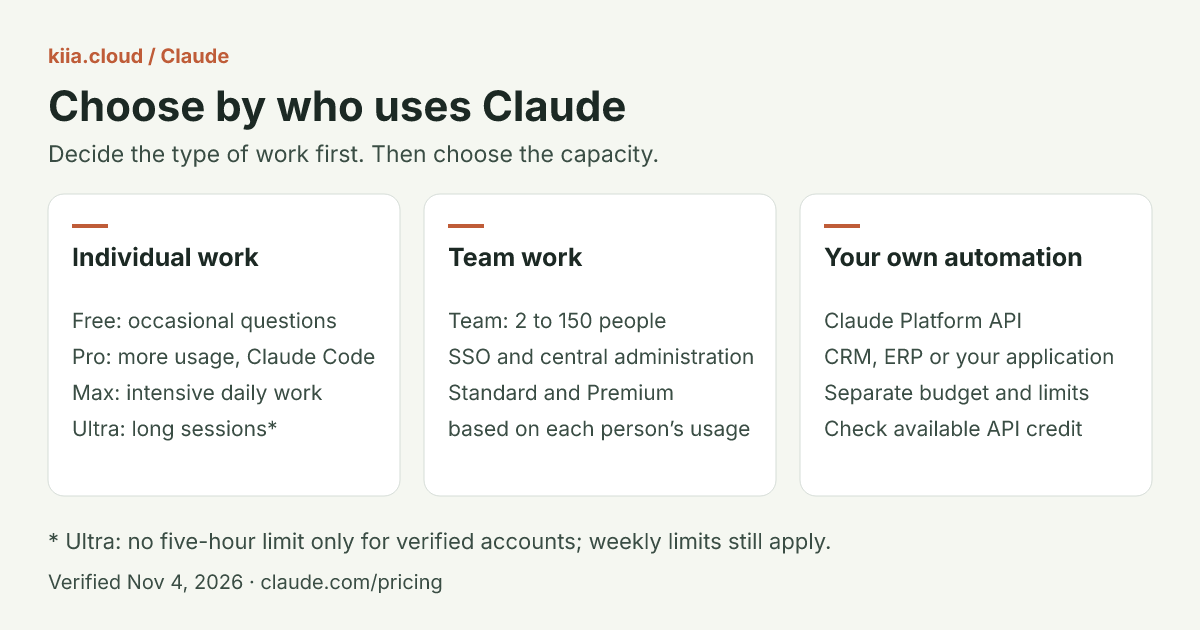
Comparison at the same scope
All amounts are USD web references before tax. “1×” means Pro’s allowance, not a fixed message count. Sources for every row were checked on November 4, 2026.
| Criterion | Free | Pro | Max | Ultra | Team | Verified on / official source |
|---|---|---|---|---|---|---|
| Verified entry price | 0 | 20/month; annual: 200 upfront, advertised as 17/month | 100/month | 200/month | Standard: 25/seat/month or 20 with annual billing. Premium: 125/seat/month or 100 with annual billing | Nov 4, 2026 · Pricing, Team |
| Billing | No paid subscription | Monthly or annual | Monthly only | Monthly only | Monthly or annual; 2 to 150 seats | Nov 4, 2026 · Pricing, Max, Ultra, Team |
| Five-hour limit | Limited usage | 1× | 5× Pro | No such limit for verified accounts; temporary limit before verification | Per person: Standard 1.25× Pro per session; Premium 6.25× | Nov 4, 2026 · Pricing, Ultra, Team |
| Weekly usage | Limited | 1× | 5× Pro | 10× Pro | Per-person cap; weekly multiple against Pro not published / verify | Nov 4, 2026 · Pricing, Team |
| Fable | No | With usage credits | Up to 50% of the weekly limit | Up to 50% of the weekly limit | Pricing specifies up to 50% weekly on Premium; Standard inclusion not published / verify | Nov 4, 2026 · Pricing |
| Included monthly API credits | No | No | 100 | 200 | Pool: 20 per Standard and 100 per Premium; 500/month maximum | Nov 4, 2026 · API credits help |
| Claude Code through the subscription | No | Yes | Yes | Yes | Yes, Standard and Premium | Nov 4, 2026 · Pricing |
| Admin controls | No SSO or central billing | No SSO or central billing | No SSO or central billing | No SSO or central billing | SSO, central administration and billing | Nov 4, 2026 · Pricing, Team |
Anthropic advertises annual Pro as 17/month with a 200 annual charge. We preserve both published figures without turning the rounded amount into a monthly payment. Team Premium has five times Standard’s capacity; do not equate it with an individual Max subscription. Seat usage limits belong to each person, while Team’s API credit is pooled. Pricing and Team help, checked November 4.
Data, access and integrations before subscribing
| Criterion | What to check for this decision | Source / date |
|---|---|---|
| Where processing and data live | This comparison does not verify contractual residency or retention. Confirm both for your data before choosing; USD pricing does not identify a processing region. | Conditions to confirm with Anthropic · Nov 4, 2026 |
| MCP status | Check the specific connector and its conditions. Having a connector does not remove plan limits. | Connectors guide · Nov 4, 2026 |
| Authentication | For individual use, review your account and connections. Evaluate Team if you need company SSO and central management. | Pricing · Nov 4, 2026 |
| Respects user permissions | Test each connection’s authorization and scope with a test account. A higher plan alone does not establish safe permissions. | Connectors guide · Nov 4, 2026 |
| Integrations | Claude Code is included from Pro upward. To connect your own application through the API, separate the Claude Platform organization, credentials and budget. | Pricing, API credits · Nov 4, 2026 |
| LATAM support and Spain | Check supported locations and local checkout. Country-specific support languages and hours are not verified in this guide. | Supported locations, Team · Nov 4, 2026 |
What a verified Ultra account means
Anthropic verifies automatically using factors such as account and payment history. In Settings > Usage, an absent Current session bar indicates verification. A temporary limit applies until then. Phone verification at checkout is a separate process. Help lists neither a manual application nor a deadline for removing the limit. Official explanation, checked November 4.
Ultra retains the general weekly limit and a separate Fable limit. Anthropic may also impose other capacity, model or feature caps. Do not subscribe on the assumption that “no five-hour limit” means unlimited usage.
Availability, currency and taxes in LATAM and Spain
The Claude access list, checked November 4, includes Spain and LATAM countries such as Argentina, Chile, Colombia, Mexico and Peru. Check your country: the list alone does not guarantee that every plan, feature or credit is enabled for your account.
Team’s listed prices are for US customers; pricing, currency and tax treatment vary by region. Check your plan at claude.ai/upgrade. Max and Ultra also warn that mobile prices can differ from web prices. We do not provide conversions to euros or Latin American currencies.
Your billing address determines tax calculation. Review your address, business details and applicable tax or VAT ID before paying. The tax field depends on location; entering a tax ID does not establish a VAT exemption. Your tax-inclusive local total is to be verified at checkout. Sources: billing address and tax calculation and tax identification, checked November 4.
When an upgrade is unnecessary
Hitting a limit once does not establish a need for another subscription. Spend a week recording interrupted tasks, the cap you reached and work that can wait for a reset. That record helps distinguish a spike from a recurring block.
For a spike, consider usage credits: separately paid usage at standard API rates that lets you continue in Claude or Claude Code after exhausting the included allowance. Set a monthly cap and review auto-reload. Compare observed spending with the next plan before switching; savings are not guaranteed.
If a workflow must run from your CRM, ERP or application, evaluate direct API access with its own budget. Buying Ultra does not configure or operate that integration. The guide to AI subscriptions, APIs and open models for small businesses helps you choose how to pay for that usage. Include review and maintenance in the real cost of an AI agent.
Included API credits: what they fund in an agent
Max, Ultra and Team can fund your agent’s calls on Claude Platform. The credits help article, verified November 4, requires an eligible active plan for at least seven days and linking an organization through Billing. For Team, an Owner or Primary Owner claims; Console requires an Owner, Admin or Billing role. Check the grant before budgeting for it.
Credits refresh monthly, including on annual Team plans, and unused balance expires at the cycle’s end. They exclude interactive Claude Code, extra chat usage, and Claude through Bedrock, Vertex AI or Microsoft Foundry. For your own claude -p or Agent SDK runs, coverage requires an API key from the linked organization; subscription authentication draws from plan limits.
For a pilot, measure cost per accepted result and cap retries. The credit alone does not pay for your connectors, infrastructure or human review. Check balance and reload settings in Console to establish what happens when it runs out.
How to compare this with ChatGPT
Apply the same decision: individual work, team controls or API automation. The ChatGPT Pro vs Business guide contrasts individual and company subscriptions. The ChatGPT plan guide and limits log helps you record interruptions. Each article keeps its own verification date; one provider’s multiples do not establish equivalent tasks on another.
Next step
Choose a frequent task and spend a week recording interruptions, consumption and accepted results on your current plan. Then decide whether you need more individual capacity, team administration or an API integration. Bring that task and its constraints to a Kiia discovery call if you need help defining the first workflow.
Frequently asked questions
Do I need Ultra if I occasionally hit a Claude limit?
First record which limit you hit. For an isolated spike, you can wait for the reset or consider usage credits with a spending cap. Ultra is worth testing if you need long sessions and your account is verified; weekly limits still apply.
How do I verify my Ultra account to remove the five-hour limit?
Anthropic verifies accounts automatically using factors such as account and payment history. It lists no manual application or completion deadline. In Settings > Usage, the absence of the Current session bar indicates verification. Phone verification is a separate step.
Can I use the included API credits to keep working in Claude Code?
They do not cover interactive Claude Code or extra usage credits in chat. They fund the API and agents on Claude Platform through your linked organization. Your own claude -p or Agent SDK workflow can use them with that organization's API key; subscription authentication draws from your plan limits.
From insight to action
Want to turn this into an agent that works for your team?
Tell us which process you want to improve. In a free call, we will identify the first workflow worth building.